
FastNesting Logo

FastNesting

Optimization for Rhino

Move from Rhino 3D furniture models to optimized panel layouts, cut lists, labels, machining drawings, and PDF/Excel reports. Designed for workshops using melamine, plywood, MDF, and other sheet materials.

View pricing
Current V. 1.1.4.5
One-time payment
Lifetime access
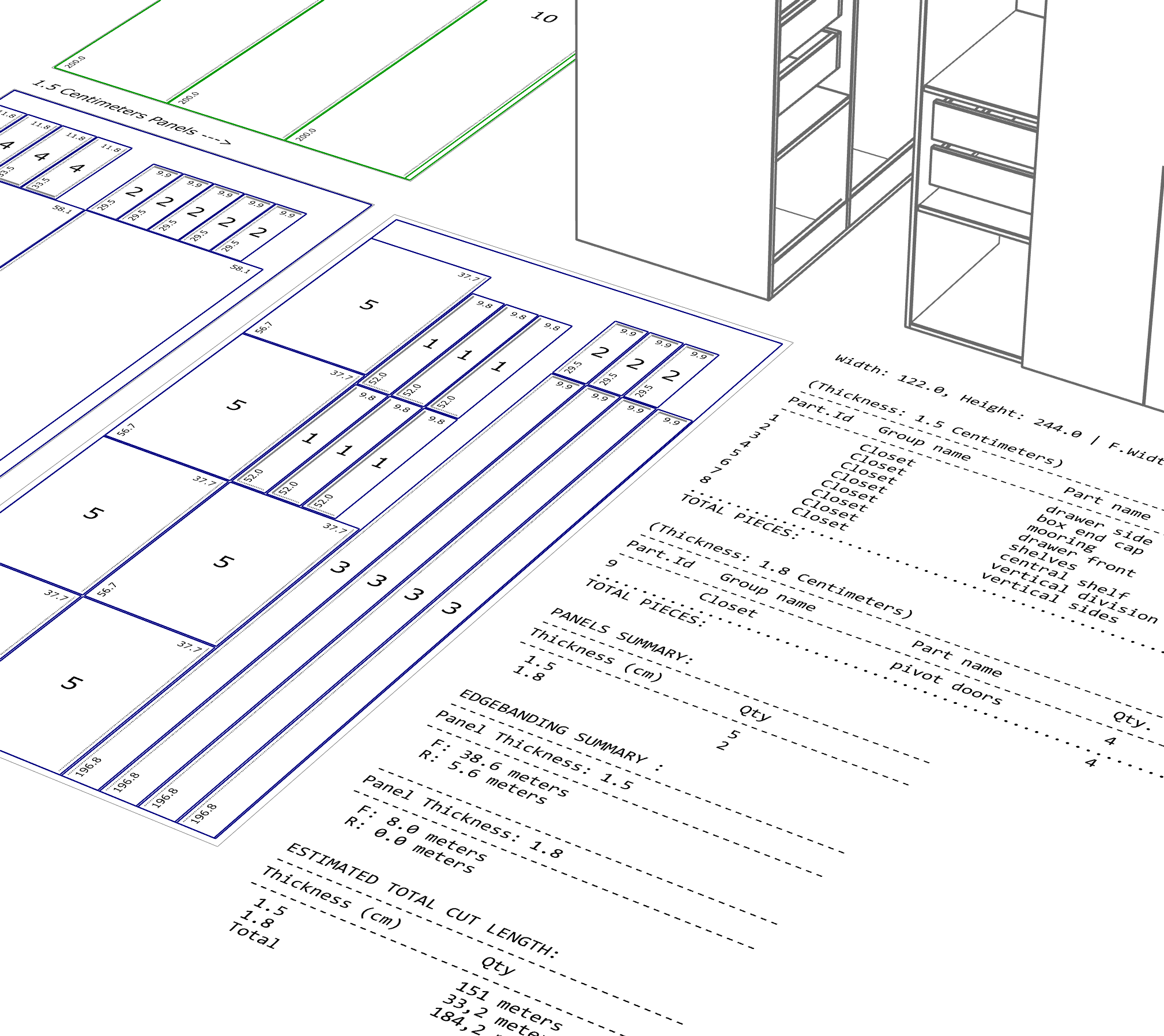
FastNesting nested layout and report workflow in Rhino

What's New

Latest improvements and updates

Version 1.1.4 May 10, 2026

Edgeband presets can use 0 mm (rigid and flexible) so you keep BOM and totals without shrinking finished nest sizes. Machining is easier to read with Side A / Side B and X-ray modes; mirrored parts no longer mirror the wrong 2D. Pro users can optionally add piece-number dots on source 3D solids from Settings after nesting. Overall nesting, drawing, and part-list workflows are smoother with fewer geometry surprises.

Version 1.1.3 Apr 28, 2026

Improves nesting consistency in demanding layouts, adds stronger 2D machining drawing parity between Rhino and PDF, refines report regeneration, improves macOS readability, and grants eligible users a fresh 10 calendar day PRO trial.

Version 1.1.2 Feb 22, 2026

Settings now centralize panel parameters and units—no need to set them every time you launch. New features: panel size per material (PRO), cut ruler at the bottom of each panel, estimated weight in reports (PRO), and roughing margin per piece (PRO). New commands: Settings_FastNesting and Clean_FastNesting. Improvements: clearer UI in Settings and Panel Parameters, better report organization, and improved nesting algorithm with the option Veneer match by Group (prioritizes keeping parts from the same assembly close together).

Try it risk-free:

  1. Read the online manual or download the PDF user guide (1.1.4)
  2. Review the update instructions
  3. Or install from Rhino Package Manager / Food4Rhino
  4. Install in seconds
  5. Start optimizing immediately
  6. Explore the workflow before purchasing

If you continue with the Free version:

  • → Upgrade to PRO anytime to unlock full features again
  • → Your settings are preserved

Complete nesting solution

All the tools you need for furniture manufacturing

Rectangular piece nesting

Optimized nesting algorithm for rectangular furniture pieces. Groups by material thickness and organizes layouts efficiently.

Custom sheet sizes

Support for any material dimensions. Automatically nests pieces onto sheets, grouped by material thickness.

Edge banding

Calculates and groups edge banding by thickness, based on user-defined edges.

Production report

Automatically generates detailed cutting and edge banding summaries, ready for workshop use.

Report regeneration mode

Create new reports from existing nesting layouts without re-running the algorithm. Perfect for manual adjustments.

Smart labeling system

Three labeling modes (Numbers, Names, All Info) to suit different production workflows and CNC requirements.

Excel & PDF export

Generate detailed Excel spreadsheets and professional PDF reports with cutting lists and piece labels.

Cross-platform support

Works on Windows (Rhino 7/8) and macOS (Rhino 8). Optimized interface for both platforms.

Rhino integration

Direct integration with Rhinoceros 3D. Works with your existing units and workflow.

Simple, transparent pricing

One payment, lifetime access

One-Seat

$79.00 inc. VAT

Install on 1 computer

One license key tied to one email

Buy One-Seat
Most Popular

Three seats (PRO)

$99.00 inc. VAT

Install on up to 3 computers

One license key, one email, 3 computers

Buy Three-Seats

Everything below is included in both licenses:

Lifetime license No subscriptions
All PRO Features Up to 8,000 pieces per nest
Export Options PDF & Excel stickers included
Smart Tools Edge banding & report regeneration
Version Updates Included Free updates for the current licensed version
Priority Support Fast email assistance

How it works

Get started in minutes

1

Download & Install

Download the plugin and follow the simple steps to install it manually in Rhinoceros 3D.

2

Activate License

Enter your email and license key received via email to activate.

3

Start Optimizing

Begin nesting your projects and save time and material immediately.

Ready to organize your materials?

Join furniture manufacturers using FastNesting for their production workflows.

Contact Us Now